Software Modernization and Application Rebuilds
Modernize your legacy applications and migrate to the cloud securely. Our team handles everything from source code review to launch.
Helping Businesses Modernize Legacy Systems Since 2007
Software modernization helps businesses whose day-to-day operations rely on an application that now slows their teams down. It replaces a fragile system with up-to-date software and securely transfers your existing data.
Exolnet has modernized applications for organizations across Quebec, the rest of Eastern Canada and the northeastern United States since 2007. Our Montréal team handles the entire project, from reviewing legacy source code to migrating your data.
What Is Software Modernization?
Software modernization involves updating or rebuilding an existing application to meet your current business needs.
Depending on the condition of your system, the work may involve updating the technology, redesigning the interface, automating tasks, adding features or integrating with other systems. It often includes migrating to the cloud and adopting a more current technology stack.
Signs Your Business Needs to Modernize Its Software
Legacy software often shows warning signs long before it stops working.
Its interface is outdated and difficult to use.
Developers who worked on it over the past 20 years are no longer available.
It relies on outdated technology and you can no longer maintain it.
It has gone years without updates and may have security vulnerabilities.
Your staff bypass it and do some tasks by hand.
It cannot integrate with your other systems or support AI features.
It is unavailable online, making remote work difficult.
Is your software holding back your projects? Request a free quote to see whether it is time to modernize.
Migrating a Legacy Windows Application to the Cloud
Software modernization turns an application installed on every workstation into a web application. Your teams gain broader access while keeping the features they rely on.
Criterion | Legacy Windows Application | Modernized Web Application |
|---|---|---|
Access | Installed on each workstation | Accessible from anywhere on your devices |
Updates | Deployed to each workstation | Centralized and easier to deploy |
Integrations | Often limited | Connects to your current software and systems |
Hosting | On-premises servers or workstations | Reliable, scalable cloud hosting |
User Experience | Workflows designed years ago | Redesigned interface and workflows |
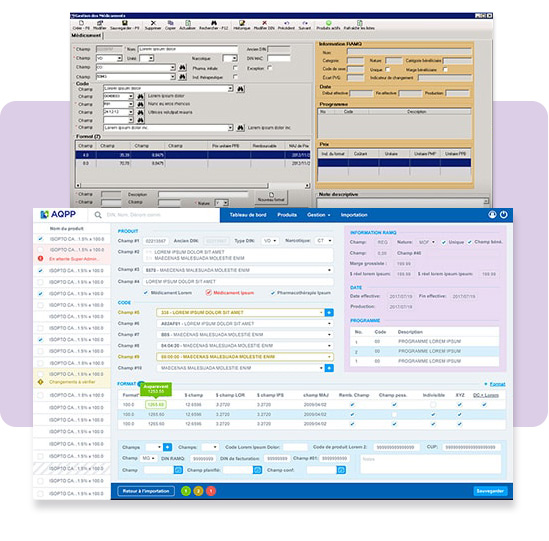
For the AQPP, rebuilding Substance replaced a Windows system from 2008 that had to be installed on each workstation. The application now runs on AWS and is accessible from any computer. If your application runs on Microsoft Access or FileMaker, explore our custom database software services.
Key Steps for a Successful Data Migration
Data loss is a common concern when modernizing software. A structured migration process helps minimize that risk.
Inventory your data.
Identify duplicates and errors, then assess how critical each type of data is. Decide what to migrate, correct or archive.Plan your migration.
Choose a phased migration, a one-time transfer or a transition period with both systems running in parallel.Prepare your data.
Map your legacy data structure to the new one. For example, customer addresses stored in older software may need to be reformatted for the Google Maps API.Test and validate.
Run several migration tests to verify that the data is complete and accurate. Prepare backups and a rollback plan.Go live.
Run the final transfer with minimal disruption, then monitor the new system closely.
Learn more about data migration during software modernization.
Does your legacy system hold years of critical data?
Our Software Modernization Process
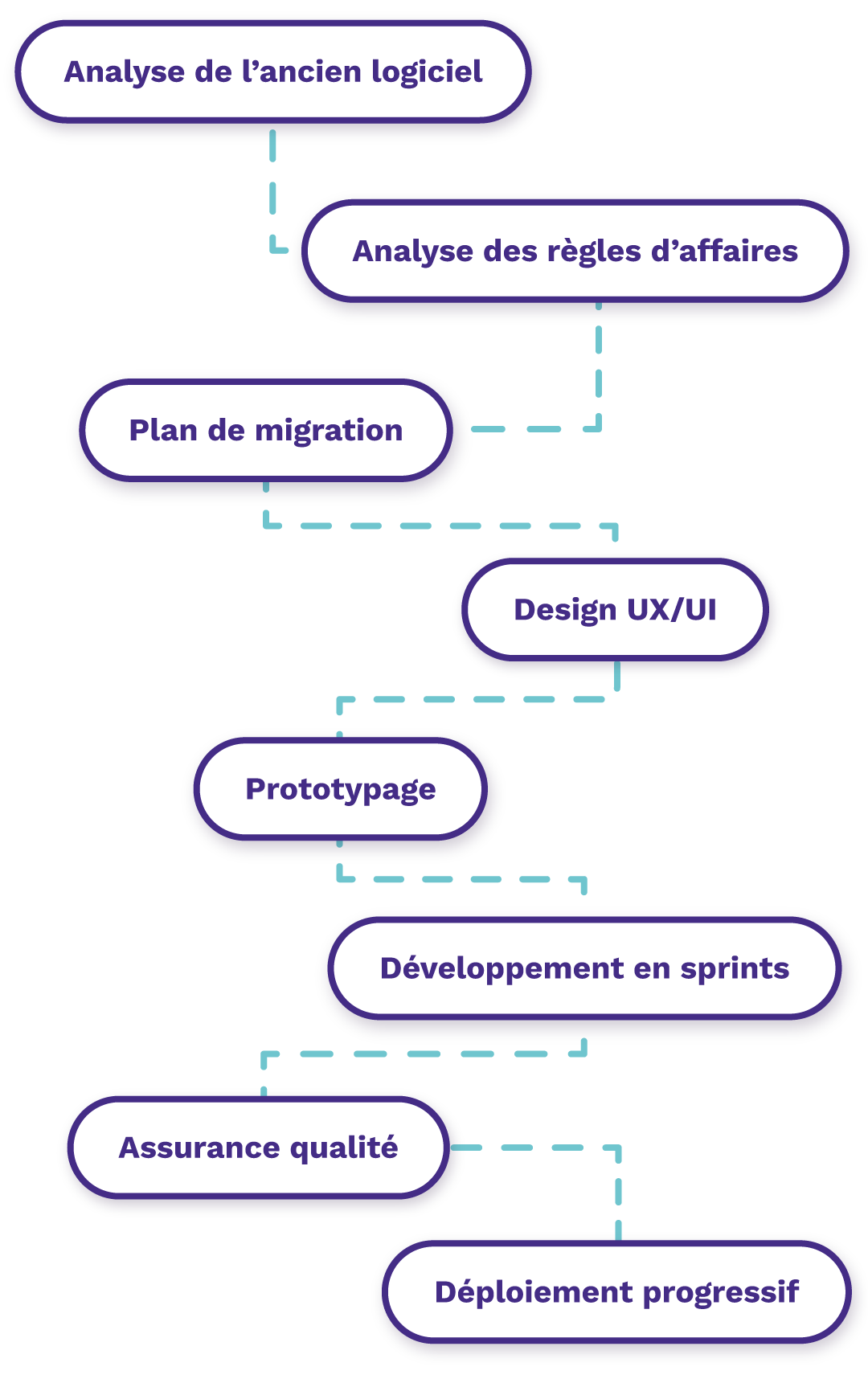
We document the business logic in your existing software before building the new application.
Review the legacy source code and documentation
Assess your business rules and requirements
Plan the data migration
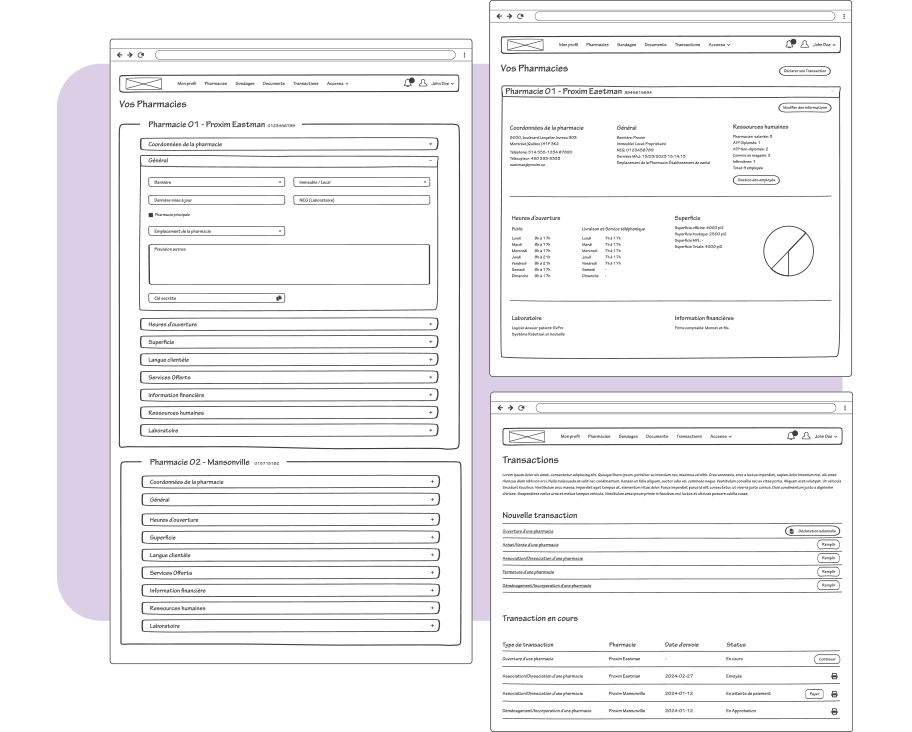
Design the interfaces and identify UX improvements
Build a clickable prototype to compare the old and new applications
Develop in two-week sprints
Run quality assurance and automated tests
Deploy the new application and keep the legacy system running in parallel during the transition
Improve Usability and Reliability During an Application Rebuild
A software rebuild lets you build accessibility, testing and monitoring into the new application from the start.
User Experience
Our designers work with your users to create accessible interfaces for different screen sizes, including touchscreens. Voice commands can speed up some tasks. Explore our digital product design services.
Testing and Monitoring
We use unit tests, end-to-end tests and appropriate code coverage to catch regressions before release. Once the application is live, Sentry and New Relic help us identify and address issues quickly.
Why Choose Exolnet to Modernize Your Software?
Modernizing an application with Exolnet gives you access to a full team of specialists and reduces your reliance on one or two individual developers.
Our Montréal team of more than 20 specialists has completed over 250 projects since 2007. We handle the full project, from reviewing your legacy source code to deploying the new application. For SDEM-SEMO, we rebuilt an outdated application as a platform hosted on AWS and added a data import tool and two-factor authentication.
“I’m pleased to be able to count on the Exolnet team to support the AQPP in its digital transformation. We’ve worked together for several years on a range of major technology projects. Their expertise and deep understanding of our processes make Exolnet a valuable long-term partner.”
Modernized Software That Supports Your Business Goals
Software modernization helps protect your data and gives your teams an application they want to use. It is part of our custom software development services. If your existing system serves several departments, a custom ERP may be the right approach.
Ask our team to assess your current software.
Software Modernization FAQs
Can you reuse parts of my legacy application?
It depends on how old the application is and how well it has been maintained. Software that is more than 15 years old often relies on outdated technology, so the source code can rarely be reused. A technical audit can confirm what is reusable. We can review the code to recover the business logic and understand how each feature works. If the application has been maintained over the years, an upgrade may still be possible.
Can you migrate a legacy Windows application to the cloud?
Yes. Cloud migration is one of our specialties. We rebuild your Windows application as a web application, preserve its essential features and transfer the data securely. Cloud-based software makes it easier to work remotely across devices, roll out updates and integrate with your other systems. It can also scale as your organization grows.
When should you modernize your software?
Consider modernization when your software slows down and your teams grow frustrated using it. Act sooner if the application can no longer be maintained or security vulnerabilities put your data at risk. A system designed 20 years ago may also have trouble keeping up with how your business operates today. A technical assessment helps you plan the transition.
Why modernize a legacy application?
Modernizing an application helps your business stay competitive and makes everyday work easier for your teams. A modern architecture also makes it easier to integrate AI and protect data. Modernization can support compliance with Quebec’s Law 25, which governs the protection of personal information. In some sectors, including health care, it may also be needed to obtain certification.
Let’s talk technology!
We’d be more than happy to chat about your technology goals and always enjoy learning about new businesses along the way. Get in touch today!