Artificial Intelligence
What Is RAG in AI, and What Is Retrieval-Augmented Generation Used For?

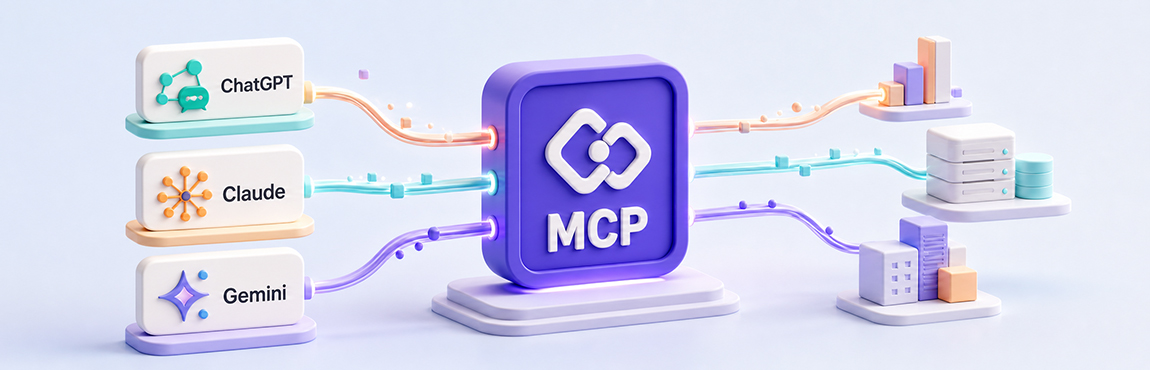
Your AI assistants excel at writing, summarizing, or answering questions, but they hit a wall as soon as they need to interact with your systems, such as creating a ticket or updating a customer file. An MCP (Model Context Protocol) server removes that barrier by connecting AI to your tools, without custom development for every connection.
It standardizes how your applications communicate with your AI tools, which speeds up integration while improving control and scalability. It is often compared to a USB-C port: one format to plug in any tool.
This guide explains what an MCP server is, how it differs from an API and RAG, how to integrate it in four steps, and where it delivers the most value. You’ll come away with a clear understanding to assess your own architecture.
An MCP server is a program that exposes structured capabilities to an AI agent: tools, context sources, and request templates. It is what makes your systems usable by an agent.
It is important to distinguish between several elements. The MCP protocol is the standard that defines the rules of communication. Software development kits (SDKs) make it easier to build servers that comply with the protocol. Finally, an MCP server is the concrete implementation of the protocol that makes your tools and data accessible to the AI agent.
Some servers already exist for popular tools (Google, GitHub, Figma, etc.), but you can also develop a custom one for your specific needs.
The typical flow of an MCP server is straightforward. The client starts a session on an MCP server, lists the available tools to discover its capabilities, then calls the right tools with validated parameters. In the background, exchanges happen in JSON-RPC, a structured format for requesting an action, receiving a response, and managing available capabilities.
MCP is an open standard introduced by Anthropic at the end of 2024. It has since been adopted by several platforms such as ChatGPT, Gemini, and Microsoft Copilot, without yet being a definitive standard.
The question comes up often: does MCP replace your APIs? The answer is no, because the two play complementary roles.
APIs remain essential for exposing stable, transactional, and controlled functions between your systems. MCP adds a layer on top designed for AI agents: tool discovery, model-readable descriptions, typed input schemas, and context.
That said, be careful about how you use it. An MCP server is suited to real-time communication, as is the case with AI agents. Using it to interconnect traditional systems with one another is not appropriate, because it adds an unnecessary layer, which creates performance issues.
The good news is that if you already have an API, you can create an MCP server alongside it that translates agent calls to the right endpoints. You reuse what already exists instead of rebuilding everything. And if your API is documented as well, that is even better, because the tools provided by the MCP server need to be well documented so agents understand how to use them.
MCP and RAG are often incorrectly framed in opposition, because they address two different needs and complement each other well.
RAG, or retrieval-augmented generation, is primarily used to retrieve relevant information before generating a response. It is oriented toward reading and enriching context. It does not allow you to perform write operations, such as creating a customer record in a database.
MCP, on the other hand, allows an AI agent to discover and use external tools, so it can both retrieve data (read) and carry out actions (write). The AI agent must use these tools to access the information, so additional delays should be expected.
The difference can be summed up in one formula: RAG helps AI start with better context, and MCP helps AI take action. To learn more about information retrieval, read our article on RAG in artificial intelligence.
Criterion | RAG | MCP |
|---|---|---|
Objective | Retrieve information | Discover and use tools |
Orientation | Reading and context | Reading and action |
Data writing | No | Yes |
Performance | Fast | Slower, the more tools need to be called |
Example | Answering based on a policy | Creating a ticket in a tool |
Key question | What does the AI need to know? | What can the AI do? |
RAG is a perfect fit for several situations.
Searching internal policies, procedures, contracts, or technical documentation.
Intelligent FAQs and documentation support assistants.
Data that changes frequently, but without actions being executed in your business systems.
A priority on response quality rather than process automation.
A need for a fast answer, without waiting for an agent to call multiple tools.
MCP comes into its own in other cases.
The assistant must interact with several business applications.
Creating or updating records in a CRM, an ERP, or another system.
Triggering business actions, such as opening a ticket, creating a task, or generating a report.
Dynamic discovery of available tools by the agent.
Multiple systems to query or orchestrate within a single request.
Wondering which approach best fits your context? Talk to our team to clarify your needs.
Successfully developing an MCP server is more a matter of method than technology. Here is a proven four-step approach.
Start small. Choose a clear business problem and a specific use case: document search, ticket creation, CRM lookup, or file summarization. Aim for low risk, ideally read-only, with a defined scope and non-sensitive data.
Design explicit tool schemas. Precise names, useful descriptions, typed parameters, and understandable error messages help the agent identify the tools and know how to use them.
Plan for security and governance from the start. Authentication, authorization, least-privilege access, logging, and usage limits must be built in before deployment, not after.
Measure the value. Track simple indicators: time saved, error rate, adoption, number of automated actions, and cost per execution.
This logic aligns with any successful technology project: a measured return on investment before scaling up. For the mechanics of connecting systems, our application and systems integration service supports these projects.
Imagine an assistant that helps professionals draft notes and prescriptions. The agent automatically identifies the medications mentioned. Thanks to MCP servers, it then retrieves the medication and patient details, such as allergies, and presents them to the professional.
As with a standard API in a healthcare setting, traceability matters. Sources consulted, document versions, user, date, and justification for access can all be retained. Permissions are validated at the MCP level so that the agent accesses only authorized data, without compromising confidentiality.
Human validation remains essential for any recommendation related to compliance, quality, or a sensitive decision. The agent and the MCP server speed up access to information; they do not replace regulatory processes. See our solutions for healthcare and pharmaceuticals.
Now think of a project copilot that reviews plans, contracts, schedules, budgets, change requests, and client communications.
A manager in the field is faced with a subcontractor’s question: why does the curtain wall anchoring for lot 42 not match the original plans? Without MCP, they have to juggle the project management software to check change orders, the document management system to find the right version of the plan, and their emails.
With an MCP server, they simply submit the question to the AI. The agent uses the right tools—project management, document management, and messaging—to find the answer and summarize it. Discover our solutions for real estate, architecture, and construction.
A few mistakes come up often in MCP projects. Knowing them will help you avoid costly detours.
Do not connect too many systems from the start. Begin with a clear, measurable problem.
Do not leave security until the end. Permissions, logs, secrets, and validations must be integrated from the pilot stage onward. The OAuth standard is widely used to manage access, so make sure you can integrate it, especially with an older system.
Plan a “sandbox” environment to test MCP tools safely without risk to your production data or operations.
Keep a human review step for sensitive actions, especially those that modify data or trigger a process.
Define your success metrics before deployment to avoid a project that is technically interesting but of little practical value.
An MCP server is a modern integration layer that makes your business systems usable by AI assistants. The Model Context Protocol transforms an agent that can talk into an agent that can act.
Keep two ideas in mind. MCP complements your APIs rather than replacing them. And the best place to start is by choosing a single high-value business objective, with a clear scope, minimal permissions, and precise indicators.
Before getting started, assess your current architecture: available data, critical systems, risks, and quick wins. Talk to our specialists about your project to define the first use case to prioritize.
An MCP server is a program that exposes structured capabilities to an AI agent: tools, context sources, and request templates. The client starts a session, discovers the available tools, then calls them with the right parameters. In the background, exchanges happen through JSON-RPC. In this way, the server makes your business systems truly usable by an intelligent assistant, instead of leaving them isolated.
An API exposes stable, transactional functions between systems. MCP adds an AI-agent-oriented layer on top: tool discovery, model-readable descriptions, and typed, documented input schemas. MCP therefore does not replace the API; it builds on it. If you already have an API, you can create an MCP server alongside it that translates agent calls to the right existing endpoints.
Not necessarily, because they address different needs and are often combined. RAG retrieves information to enrich the context of a question, without modifying your systems. MCP instead allows the agent to use tools and execute concrete actions. In short, RAG helps AI start with better context, and MCP helps AI take action. Many projects bring them together to cover both reading and action.
We’d be more than happy to chat about your technology goals and always enjoy learning about new businesses along the way. Get in touch today!